
New firmware
Firmware Samsung SL-C480/480W/480FW (SD) V3.00.01.21fCompatible models: Samsung SL-C480, Samsung SL-C480FW, Samsung SL-C480w
Firmware HP LASER 150A/150NW (SD) V3.82.01.08f + 5 dotsCompatible models: HP LASER 150A, HP LASER 150NW
Firmware HP LASER MFP 178FNW (SD) V3.82.01.07f + 5 dotsCompatible models: HP LASER MFP 178FNW
Firmware Xerox B215 (SD) // 10 symbols 85.000.58.000f // SN + 5Compatible models: Xerox B215
Firmware Xerox B210 (SD) // 10 symbols 85.000.58.000f // SN + 5Compatible models: Xerox B210


New firmwares
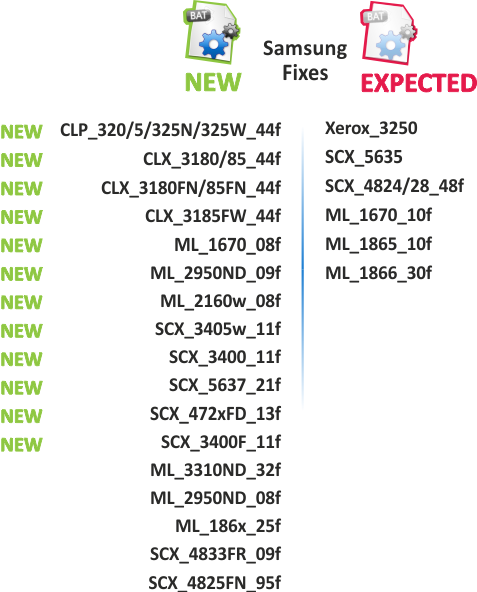
Dear customers, we are glad to inform you that new firmwares are available for these devices:
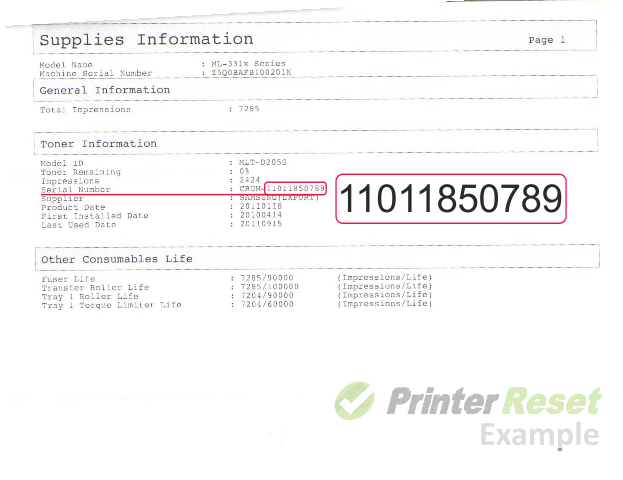
Unfortunately, due to the fact that our reprogramming files have been cracked lately more often, we had to increase the protection of our product. Now for ordering our firmware, except the serial number, you must provide also the „Crum” number of the chip (more here). See here, how to print reports with the needed data. In connection with the modernization of the firmware generating technology, also the process of reprogramming the device has changed. Now, as an obligation for reprogramming the device, is the actual availability of the chip in the printer while the reprogramming is being done. And the chip, which is in the cartridge, will be your „chip-key”. So, below you’ll find the decription on how to reprogramm the device, when the Crum number is required.
Before you continue with the reprogramming of the firmware, please make sure that the device is installed on your computer.
It is very important that under no circumstances should you remove the chip from the cartridge while reprogramming the firmware. After you have succesfully reprogrammed the printer, remove the chip from the cartridge and store it somewhere safely (the chip - a key). In all cartridges which you are going to use in the printer, the chip has to be either removed or sealed. If you have accidently inserted a new cartridge without removing the chip, the device will be blocked. In order to unblock it, you can use the stored chip as a key which help you to unblock the printer.
And make sure that any other devices (except mouse and keyboard), which are connected to your computer via USB or LPT ports are disconnected. It’s preferable that the computer is connected to the "UPS" (uninterruptible power source) device, because if during the reprogramming process the electricity source has any interruptions, then the reprogramming will be carried out with an error, which makes the device unable to work.
Be aware that with the reprogramming of the firmware the manufacturer’s warranty goes lost!!
1. Connect the printer to the computer and turn it on
2. Wait until the printer is ready for work
3. Run the file "download_1.bat"
4. The reprogramming process starts automatically
5. Wait until the printer reprograms (1-10 minute) and restarts
6. After that the reprogramming process is finished, restart the printer